
Table of Contents
- Escalating Firestick Warnings How the New Piracy Notifications Actually Work
- From Malware Alerts to Copyright Crackdowns Understanding Amazon and ACE's New Enforcement Partnership
- Grace Period or Silent Ban What Repeated Notices Really Mean for Your Favorite Streaming Apps
- Navigating the New Normal Practical Steps Firestick Users Can Take to Stay Safe and Stream Responsibly
- Q&A
- In Summary
Escalating Firestick Warnings How the New Piracy Notifications Actually Work
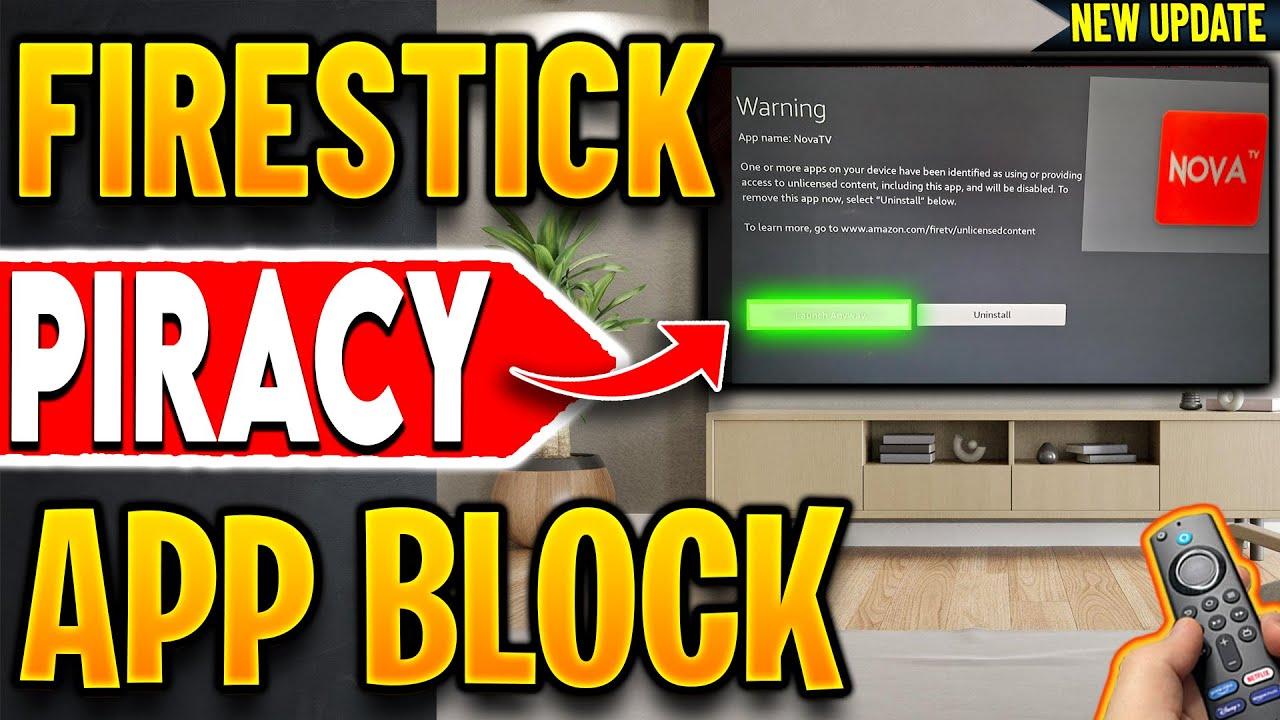
Amazon's intensified approach to curb piracy on Firesticks is more transparent-and daunting-than ever before. When the platform suspects an application provides access to copyrighted content illegally, it doesn't just disable or ban the app silently; it jumps straight to alerting the user with a clear warning message. This notice not only identifies the app in question but also offers straightforward options: "Launch Anyway" or "Uninstall". While the warning serves as a nudge toward compliance, it also hints at a potential grace period, giving users a window before full disablement kicks in. Persistent warnings might steer many towards abandoning the app altogether, or risk losing access permanently through outright disablement, making piracy mitigation feel more like a countdown than a warning.
What sets this crackdown apart is the collaborative effort between Amazon and ACE (Alliance for Creativity and Entertainment). Once ACE flags an application, Amazon's system automatically responds, alerting users with detailed messages that specify the app's risks. These messages are not just warnings-they're a part of a structured enforcement process designed to gradually phase out unauthorized content access. The inclusion of a URL directing users to more information-based on their region-further emphasizes the serious stance Amazon is adopting: content protection isn't optional anymore; it's a mandatory step in the user experience. This evolving system aims for a gradual cultural shift, nudging users away from piracy without abrupt disruptions, although the tangible impact is a more aggressive, persistent warning regime.
| Warning Stage | User Options | Next Steps |
|---|---|---|
| Initial Warning | Launch or Uninstall | Monitor warnings, consider uninstalling |
| Repeated Notices | Uninstall recommended | Full disablement likely |
From Malware Alerts to Copyright Crackdowns Understanding Amazon and ACE's New Enforcement Partnership
Amazon's latest crackdown marks a significant shift from their previous malware-focused alerts to a more targeted approach against copyright infringement. When an application is flagged by ACE (Alliance for Creativity and Entertainment), Amazon now explicitly notifies users that the app provides access to unlicensed content. This proactive alert system aims to curb piracy directly at the device level, creating a more robust barrier against unauthorized streaming sources. Users are presented with options to either continue using the app temporarily or uninstall in response to the warning, signaling a gradual transition towards stricter enforcement in the streaming ecosystem.
The partnership between Amazon and ACE is designed to escalate enforcement actions, starting with warnings and potentially leading to outright disabling of flagged applications. Here's a quick look at what this entails for everyday users:
- Visible warnings on launch indicating unlicensed content detection
- Options to ignore or uninstall applications during the grace period
- Potential for automatic app disabling if warnings are ignored
| Stage | What Happens | User Action |
|---|---|---|
| Initial warning | Notification displayed about unlicensed content | Choose to keep or uninstall the app |
| Grace period | Potential limited usage before further action | Decide to continue, uninstall, or fix the issue |
| Disabling | Application becomes unusable | Uninstall or replace with licensed app |
Grace Period or Silent Ban What Repeated Notices Really Mean for Your Favorite Streaming Apps
Understanding the Grace Period is crucial for users navigating the new wave of piracy detection on streaming devices. When Amazon flags an application for providing unlicensed content, they typically offer a temporary window-a grace period-where you can still launch or use the app before further action is taken. This period acts as a soft warning, giving users a chance to reconsider or remove the application voluntarily. During this time, reminders or notifications may appear, urging users to uninstall or switch to legal alternatives.
This deliberate delay suggests that the streaming giants prefer a silent warning phase, subtly nudging users toward compliance without immediate disruption. The goal is to transition users away from illicit streams gradually, minimizing backlash and confusion. As shown in recent notices, repetitive warnings might eventually lead to a silent ban, where the app is disabled entirely-an impactful reminder that authorities are tightening their grip on unauthorized content.
| Stage | What Happens | Implication |
|---|---|---|
| Notice Period | User sees a warning message | Option to uninstall or ignore; protection from immediate disablement |
| Repetitive Warnings | Repeated notices appear | Increased risk of silent ban or app disablement |
| Silent Ban | App is disabled without notice | Loss of access-full removal from device |
Navigating the New Normal Practical Steps Firestick Users Can Take to Stay Safe and Stream Responsibly
Practical Steps Firestick Users Can Take to Stay Safe and Stream Responsibly
To navigate this tightening crackdown, firestick users must prioritize safety by sticking to official apps and content sources. Regularly review your installed applications and remove any third-party or unverified streaming apps that could compromise your device's security or violate copyright laws. Keep your Firestick's software up to date, as Amazon often releases patches that enhance security and prevent unauthorized access. Additionally, using a reputable VPN can add a layer of anonymity and help you access legitimate content while safeguarding your online activity from prying eyes.
| Action | Benefit |
|---|---|
| Uninstall risky apps | Reduces chances of encountering illegal content alerts or malware |
| Update software regularly | Keeps your device secure against exploits and adds new safety features |
| Use official stores & verified sources | Prevents accidental installation of unlicensed or harmful apps |
Being proactive with your streaming habits and environment not only helps you avoid disruptive messages from Amazon but also ensures you enjoy your favorite content responsibly. Remember, staying informed about the latest updates and regulations can help you adapt quickly and continue streaming seamlessly in the new normal.
Q&A
Certainly! Here's a creative yet neutral Q&A blog post based on the key topics discussed in the YouTube video titled "🔴Firestick Piracy Blocking Just Got WAY Worse (New Crackdown!)":
Q&A: What's New in Amazon Firestick's Fight Against Piracy?
Q1: What recent change has Amazon implemented regarding third-party streaming apps?
A: Amazon has ramped up its efforts to block third-party streaming applications that access unlicensed content. The most notable change is that users now see specific warning messages when trying to launch apps identified as providing access to copyrighted material.
Q2: How did Amazon's message about problematic apps differ before?
A: Previously, Amazon only disabled apps due to issues like malware or security risks. Users saw generic messages informing them that an app was disabled for safety reasons. Now, the notifications explicitly state that the app has been identified as providing access to unlicensed or copyrighted content.
Q3: Who is involved in this crackdown, and how do they influence what users see?
A: Amazon is collaborating with ACE (Alliance for Creativity and Entertainment), an organization known for combating online piracy. ACE informs Amazon which apps are involved in copyright infringement, prompting Amazon to flag these apps with warnings to users.
Q4: What options do users have when they see these new warnings?
A: When encountering these messages, users can choose to continue launching the app (which may still work temporarily), or they can opt to uninstall it. The messaging suggests a possible grace period, after which continued ignoring could lead to the app being disabled permanently.
Q5: Is this change happening globally right now?
A: The initial phase of this crackdown is targeted towards Europe, with plans to expand worldwide. Amazon states this phase will start in Europe before rolling out globally.
Q6: What information does the warning message include?
A: Besides alerting users about unlicensed content, the message displays the name of the app in question and even provides a link to a page describing unlicensed content. Users can select their region (e.g., UK) to access more detailed FAQs related to this initiative.
Q7: Why is Amazon taking these steps?
A: Their goal is to protect both content creators and consumers by disabling apps that facilitate piracy. By doing so, Amazon aims to prevent legal issues tied to unlicensed content and ensure compliance with copyright laws.
Q8: If I purchased an app from Amazon's official store, could it still be disabled?
A: Yes, according to FAQs, even apps bought legitimately from the Amazon App Store could be disabled if they are found to be providing unlicensed or copyrighted content by ACE or identified by Amazon.
Q9: What should users do if they believe their app was wrongly flagged?
A: The FAQ hints at the possibility of requesting refunds or taking action if a legitimate app gets disabled. Users are encouraged to check Amazon's support resources or contact their customer service for clarification.
Q10: What does this crackdown mean for the average Firestick user?
A: This indicates a growing effort to meaningfully curb piracy on streaming devices. While this could mean fewer unauthorized apps available, it also underscores the importance of using legal and licensed streaming sources to avoid disruptions.
Have you received one of these warning messages? Share your experience in the comments below and let us know which region you're watching from!
Would you like me to tailor this further or add anything specific?